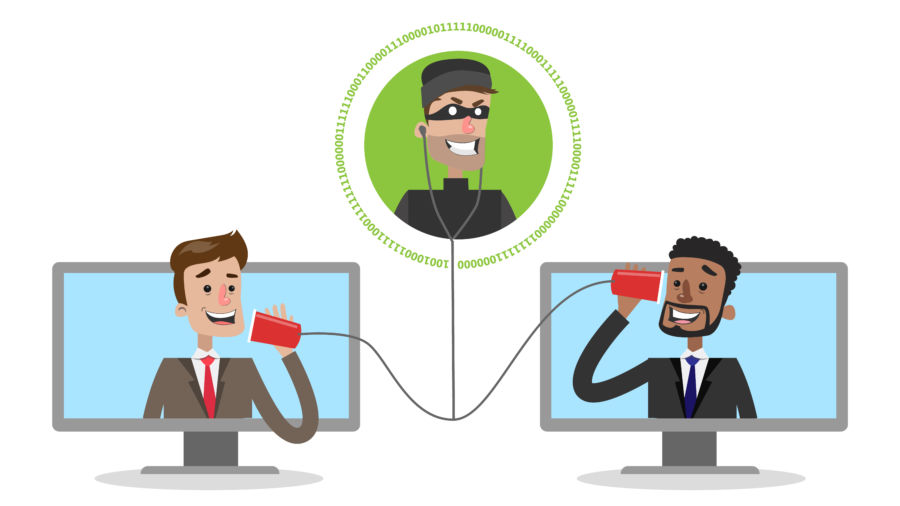

This type of cyber crime is very common and on the rise, so here’s what you need to know about MITM attacks, including how to defend yourself and your business against them.
What is a man in the middle attack? The idea behind a man-in-the-middle attack is straight forward: Intercept traffic coming from one computer and send it to the original recipient without them knowing someone has viewed, and potentially altered, their traffic. MITM attacks give the perpetrator the capability to steal funds, redirect a browser to a malicious website, or steal information to be used in later cyber crimes.
These are three popular types of MITM attacks your business will most likely encounter:
1. Email Hijacking Hackers target and gain access to important email accounts, they will then monitor activity and transactions to make their eventual attack a lot more convincing. For example, they could wait for a scenario where the customer is sending money and respond, spoofing the company’s email address, with their own bank details instead of the company’s. Unfortunately, the customer thinks they’re sending their payment to the company, but they’re really sending it right to the hacker.
2. Wi-Fi Eavesdropping Most MITM attacks rely on Wi-Fi connections. Hackers will set up a Wi-Fi connection with a legitimate-sounding name and all the hacker has to do is wait for you to connect and they’ll instantly have access to your device. Alternatively, the hacker can create a fake Wi-Fi device disguised as a legitimate Wi-Fi access point to steal the personal information of everyone who connects.
3. Session Hijacking When you log into a website, a connection between your computer and the website is established. A hacker will then hijack your session with the website through various ways. One option they use is stealing your browser cookies. Your cookies store small pieces of information that makes web browsing convenient. It can be your online activity, login credentials, pre-fill forms, and in some cases, your location. If hackers get hold of your login cookies, they can log into your accounts and assume your identity.
“Who is the typical target of a man in the middle attack?”
Any person or any business could be the target of a MITM attack.
How do I prevent man-in-the-middle attacks? There’s no simple ‘quick fix’ to protect yourself against MITM attacks, however here are a few to help you:
Only connect known, trusted devices to your Wi-Fi networks. Don’t allow devices to automatically connect.
Make sure all access points are secured and encrypted. Attackers that rely on physical proximity can be kept off a network by good security.
Keep an eye out for phishing emails that request you to click to log in to a website.
Train your staff to become a ‘Human Firewall’
Make sure operating systems are patched and updated to prevent attacks that exploit weaknesses.
How would your business stand up against a Cyber attack?
While you are reading this, you may be thinking “Doesn’t Microsoft take care of Office 365 backup?”
It’s important to remember that SaaS platform providers, like Microsoft Office 365, take on the responsibility of application uptime and the underlying infrastructure. But it is the customer’s responsibility to manage and protect their vital business data.
We’ve identified 6 reasons why backing up Office 365 is critical:
Accidental deletion: If you delete a user, whether you meant to or not, that deletion is replicated across the network. A backup can restore that user, either to on-premises Exchange or Office 365.
Retention policy gaps and confusion: Office 365 retention policies are hard to keep up with, let alone manage. A backup provides longer, more accessible retention all protected and stored in one place for easy recovery.
Internal security threats: Many businesses are experiencing threats from the inside, and they are happening more often than you think. Having a high-grade recovery solution mitigates the risk of critical data being lost or destroyed.
External security threats: Malware and viruses have done serious damage to organisations globally in just the past year alone. A backup can easily restore mailboxes to an instance before the attack.
Legal and compliance requirements: Ensure you can retrieve mailbox data during legal action and to meet any regulatory compliance needs.
Managing hybrid email deployments and migrations to Office 365: Whether you are migrating to Office 365 or have a blend of on-premises Exchange and Office 365 users, the exchange data should be managed and protected the same way, making the source location irrelevant.
It is always nice to hear how our customers and partners are validating our solutions. IT Manager at Egelim Lojistik A.S.
“Before this product I thought my emails were safe. Now, I am sure they are safe.”
Every customer can be confident that as they move to the cloud and expand their infrastructure, Veeam is there to protect and ensure Always on Availability.
What should you do to protect your business from further damage?
Should you pay that ransom demand? – Here’s a scenario based on real-life experiences.
Scenario
IT staff at fictional High Street Solicitors firm Graham Solicitors head office have been caught by a phishing email. A member of staff clicked on a link to a spoof website because they thought the email looked genuine. It wasn’t. That was two months ago. Today, is when it all goes wrong…
Tuesday 09:00
Mick Rayall, Graham Solicitors’ IT administrator, began his day clearing the company’s email inbox of the usual junk, but one message stands out. His heart stops.
“We have more where this came from. We will contact you shortly with our demands,” further down the message is someone’s name, email address and credit card details.
Mick hopes it’s a hoax, but can’t take the risk. He calls the companies security officer, Steve Richardson. Steve isn’t impressed as he’s on holiday in America where it’s 4:00am.
“This had better be important,” he sneers. Mick forwards the suspect email.
“Have we checked the credit card number?” Steve asks, with tension and sincerity in his voice. “Is it one of our customers?”
“When did we get this?” Steve snaps.
“Er, it would appear we got it yesterday just after work, so I didn’t notice it until first thing this morning.”
“So we are 12 hours into this?”
“Er, yes,” Mick mumbles sheepishly.
Tuesday 14:30
“We’ve just got a second email come through,” Mick tells Steve. “It’s a ransom demand for £15,000 in the Bitcoin crypto-currency. We have to pay by 21:00 BST or they are going to delete all of our customer records.”
“What?” shouts Steve. “I thought you told me they only had one?”
“Er, no. They are claiming to have them all.”
In a cold sweat, Steve calls Graham Solicitors’s legal counsel Margaret Greaves for advice. She has to dial in several times as her headset isn’t working properly. Her voice keeps dropping out during the conversation.
“It looks like there is a potential breach,” she says. “Don’t respond to that message. I’ll need to review our existing legislation so we know where we stand.”
“What about the police?” asks Steve, his holiday now thoroughly ruined. “Who are we going to notify?”
Tuesday 15:30
Things are rapidly spiraling out of control for Graham Solicitors. The hackers have sent a sample of customer names and credit card numbers they hold.
Steve has now confirmed that the sample is genuine.
“How about if we shut down the website?” asks Mick. “Then we can limit the risk.”
Margaret butts in. “Before we do that, who should we tell first? What’s the data breach policy?”
“I thought that info came from legal,” says Steve.
“Aren’t you in charge of data protection?” Margaret asks Mick.
“Nope, not me…”
“Oh no, is it me?” asks Steve dispiritedly. “Anyway, if we take down the website that’ll just draw attention to ourselves won’t it? I’m not sure if that’s the right thing to do.”
“Me neither,” says Margaret.
Graham Solicitors’ head of public relations, Katie Ellis, has been called in to the situation.
“This is not good,” she exclaims rather obviously. “We didn’t protect our customers’ private data. There’s a chance we’re gonna get hammered for this.”
She points out that the company has a promotion running on the website currently.
“We’re driving people to the website right now. What about their details? Are they being stolen too?”
“Quite possibly,” says Steve. “We’ve got to shut down the site – or the eCommerce side of it anyway. And then we’ve got to decide whether or not to pay their ransom.”
Tuesday 17:30
Katie Ellis has drafted a public statement but doesn’t propose releasing it until people start asking questions.
“We can just say we are experiencing an incident and do it reactively,” she says.
“No – not an incident – a breach,” Steve advises.
“Don’t use the word ‘breach’ – not yet anyway,” Margaret pipes in, thinking of the legal ramifications. Mick bursts in on the conference call.
“We’ve found some malware! We had an email come in that went to in to quarantine, we checked it out and it has an attachment. That could be it.”
“Ok, you haven’t clicked on it have you?” asks Steve, his day rapidly going from bad to worse.
“Er… I just thought it would speed things up…”
Steve swears and drops out of the call to get his security staff to check for any more damage.
Margaret turns the conversation to informing the Information Commissioner’s Office.
“We can report it online or phone them,” she tells them. “But we need to say what we did to reduce the problem.”
“We were supposed to get new threat detection software last year, but we never got round to it so it wasn’t replaced,” says Mick. “It just didn’t happen – I never got to do it.”
“Well don’t tell I.C.O. that,” Margaret shouts. “If we can’t show we have satisfactory controls in place we could be in a bit of trouble. And the cyber-insurance firm might not pay out.”
Later, Steve confirms that most recent phishing email turned out to be a red herring, but tells the team: “We’ve found a phishing email sent two months ago that was linked to a log-in page made to look like the one for our online backup provider. That’s how they got in.
“Ok, we have to handle things better from now on,” Steve concludes. “There’s no doubt in my mind that this will happen again, and it’s only going to get worse.”
So what should Graham Solicitors have done?
Reacting late has put Graham Solicitors on the back foot. You need to move very quickly in these situations otherwise the Cyber attackers will decide the pace.
A poor understanding of data breach laws made the business vulnerable. They obviously did not have a breach policy in place nor did they know who was responsible for each role.
The firm should have:
prepared a cyber-security breach plan with step-by-step actions to take
rehearsed this plan with staff
decided who is responsible for what during a breach
notified third-parties and suppliers
BE PROACTIVE -partner with an IT Cyber Security specialist for proactive support in the event of a breach
refused to pay the ransom – there is no guarantee the data would be given back.
And if your firm is the victim of a data breach:
identify where the incident came from
contain infected devices (get them offline)
assess how many machines have been affected
restore lost data from back-ups
BE REACTIVE – partner with an IT Cyber Security specialist to make sure this doesn’t happen again.